Showing posts with label landscaping. Show all posts

Monday, 12 March 2007

The crinkly bits - Landscaping

In Second Life many landscape are bland and uninteresting, smooth simple curves and rounded ridges. Well real-life landscape has crinkles!

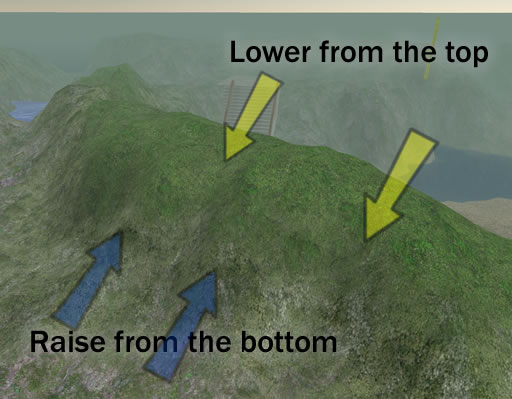
Crinkles can be added using the landscape brush. Use the medium or small brush depending on the size or your hill or vallley.

I usually start by adding ridges; using the raise brush, start sweeping it from side to side at the bottom of the ridge and work upwards making the side to side motion smaller and smaller. Repeat this a few times till you have a good looking ridge.

Move along to where another ridge will look good then raise another one until you have a decent set of ridges. High hills have fewer ridges spaced further apart.

Add dips and hollows between the ridges using the lower brush and starting at the top this time work downwards.

After a bit of practice it is easy and fund to do.

If you want to see how it looks, visit Tanglia and enjoy the Welsh style coastlines.

Thursday, 8 March 2007

Raising the land

The Second Life Islands come almost flat with no trees. To create the landscape I had to raise the land, then sculpt it.

The photo shows me raising the land. I started by placing posts to mark the height I wanted. The posts are 10m high with a line through the middle at 5m. Then I selected the piece of land and raised it, doing the following.
  1. raise a little to clear the sea floor.
  2. flatten the land
  3. raise and lower it till it comes halfway up the marker pole.
There is a deep gap between the two land masses, use the same method between the two raised sections.

Next time I hope to discuss the crinkly bits - coastline and hills
Posted by Picasa

Monday, 22 January 2007

Slartibartfast

Had a lot of fun landscaping and building a pub.

I was landscaping a large region so I tried a few ideas and discovered a new things. I will describe these on another entry together with screen shots.

I started by drawing a landscape map with key locations marked with positon and height. I took about 3 hours as I included the buildings. Then I went to the sim and created poles 0.5m x 0.5m x10m high and applied a builders texture marked off in meters. I located each one of the poles at the key locations, copying the position and heights off the map.

Using the landscape dialogue, I select a rectangle of land, flattened it and then changed the height till it came halfway up the poles. I kept doing this till most the land was the correct height. Raising the land had left deep narrow 4m valleys between each of the rectangles of land. I selected these as a 4m wide selection, flattened them, changed the height and then smoothed it.

Now I had the basic land heights and moved onto making the landscape look more realistic. I imporved the landscape with a simple technique I discovered and I will describe that and the pub in another entry.

I quite fancy doing Cornwall, I wonder if they can use me on Earth Mk. II?